Outreach CRM: a networking pipeline your own AI agent can work in
A spreadsheet-style CRM for students doing networking outreach. AI drafts each message from what the CRM knows about you and the recipient. You review and send it, and any MCP agent can work the pipeline with you.
- Type
- Product
- Timeline
- Summer – Fall 2026
- Status
- Open to the public

Most students who land a job through networking keep track of it in a spreadsheet: who they messaged, what they said, who replied, and who is owed a follow-up. The spreadsheet doesn't remind anyone, and every message starts from a blank page. Morgan Stuart built Outreach CRM to replace that spreadsheet with a pipeline that updates itself and drafts the next message from what it already knows.
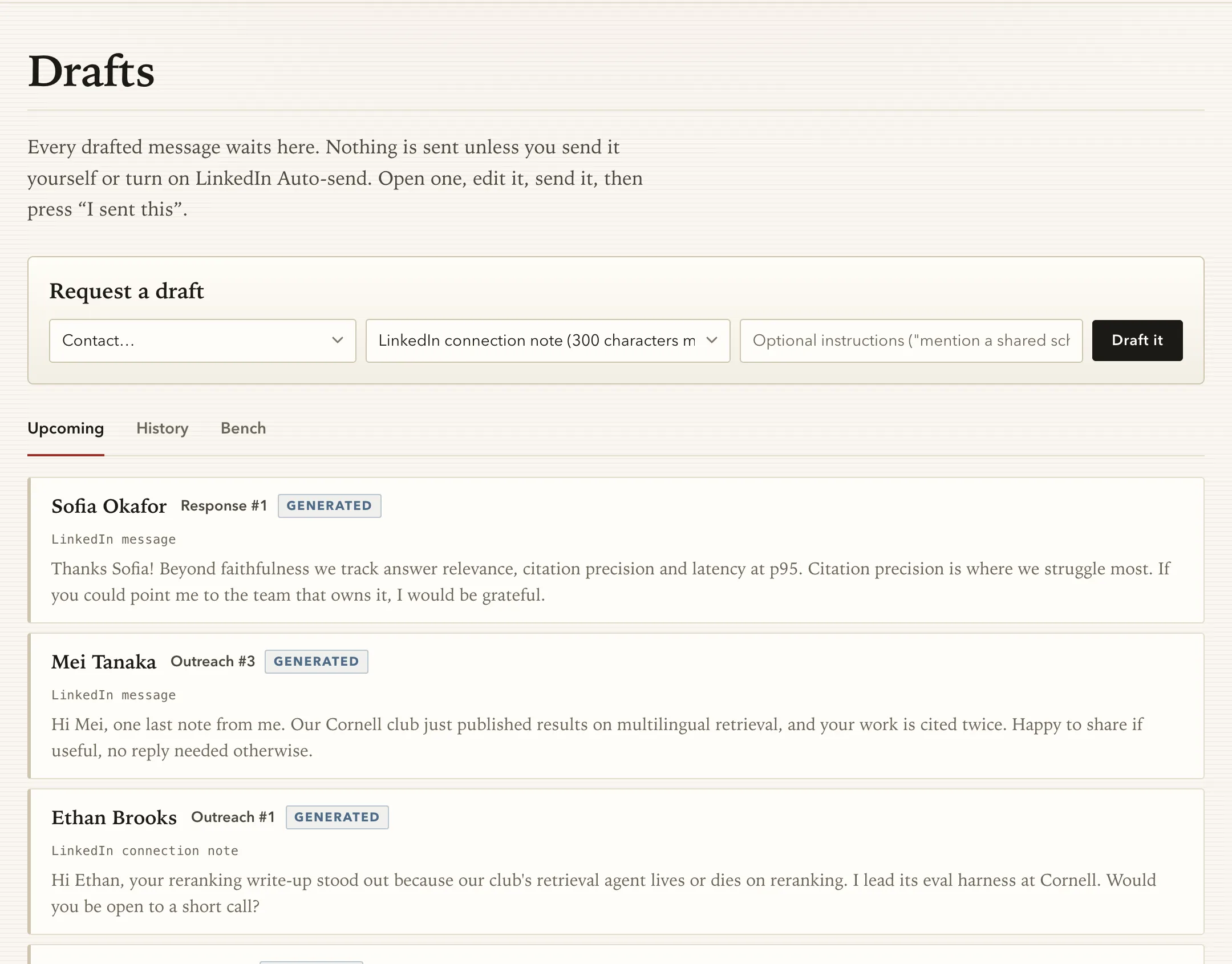
The rule from the first design doc is that AI drafts and the person sends. The CRM writes drafts, fills gaps and preps calls. By default, a person reads every message and sends it themselves.
Every screenshot here comes from a demo workspace. Its owner is a fictional Cornell student, and every person in it is invented. The companies are real names, used only as outreach targets.
The pipeline
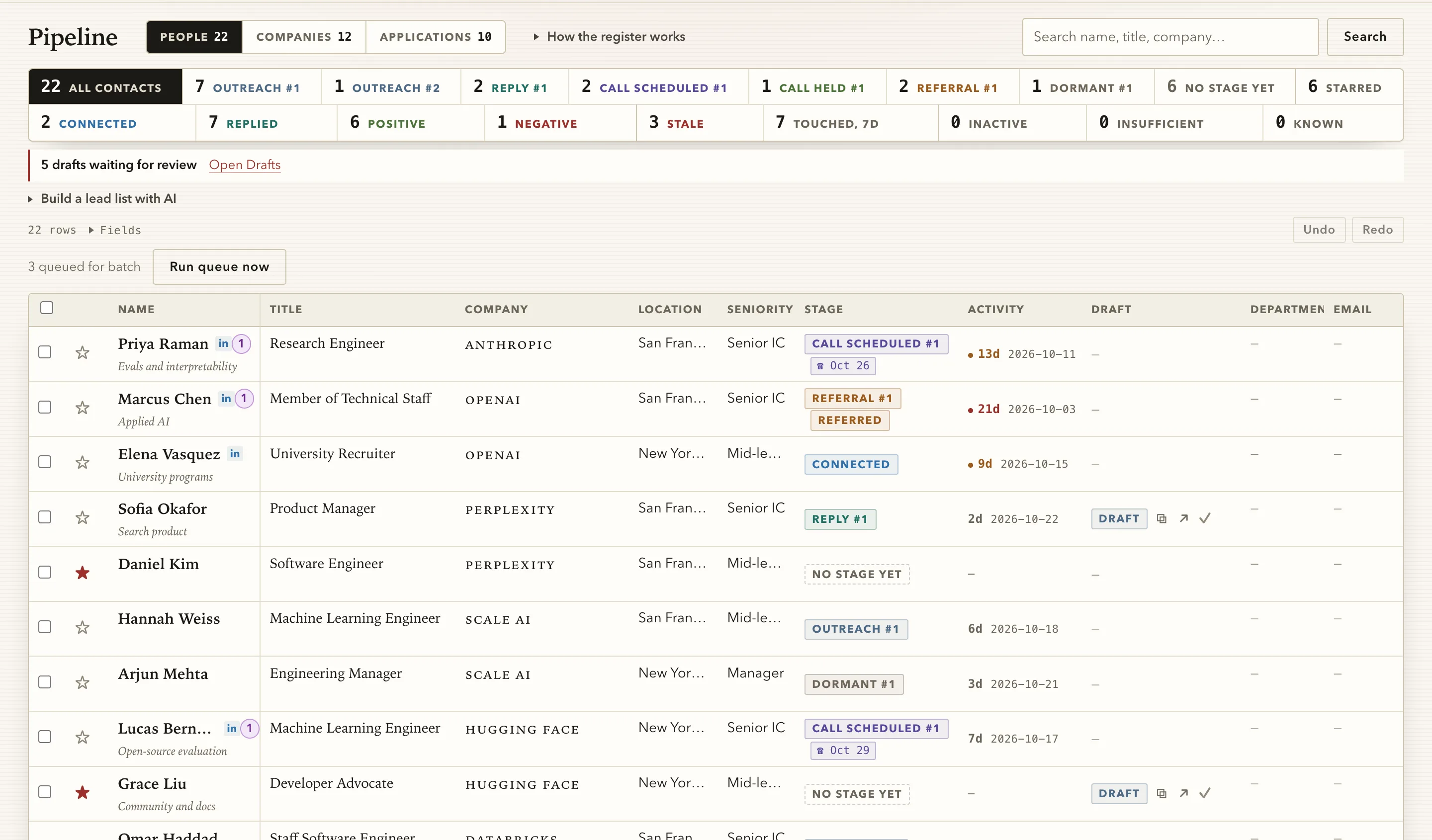
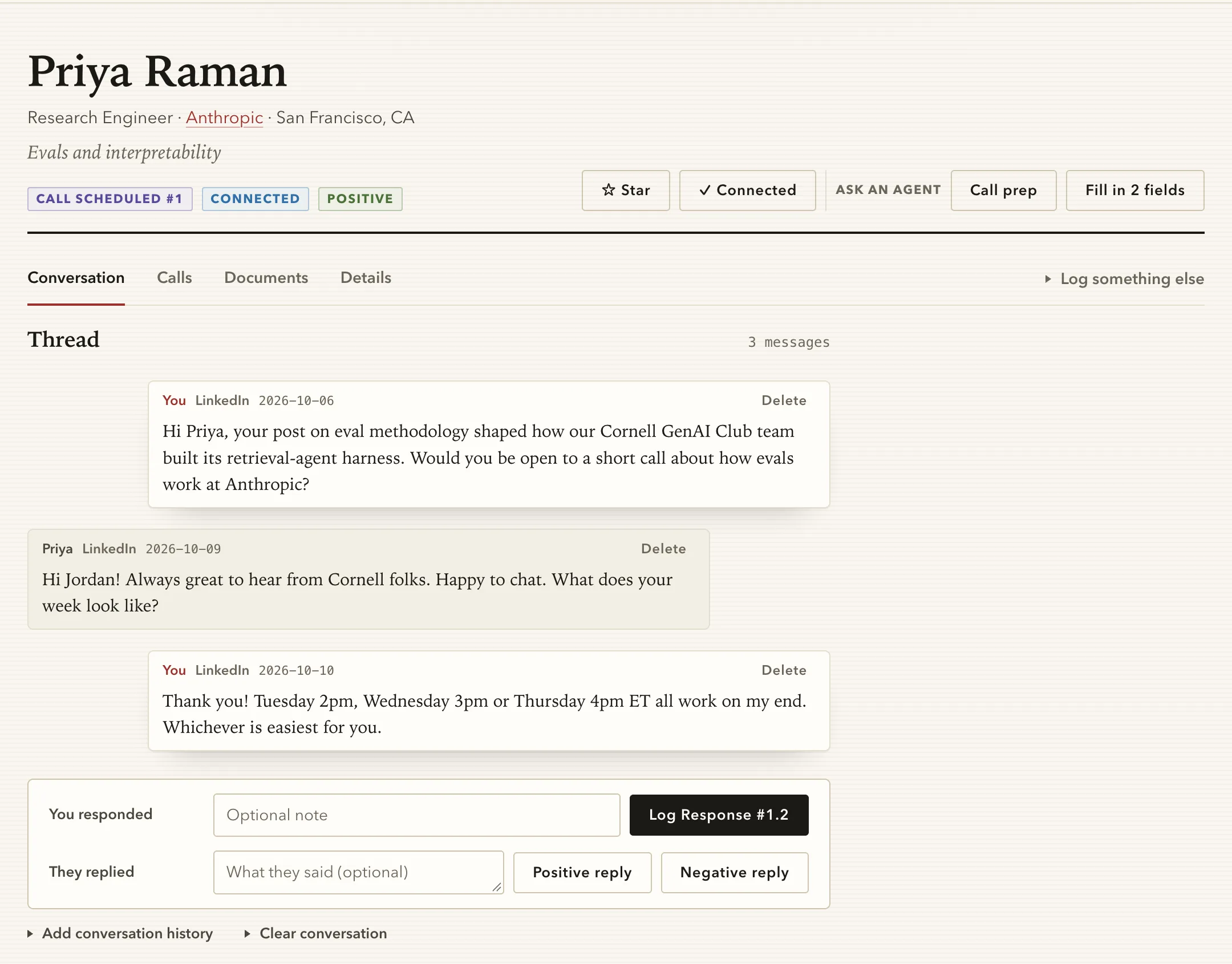
The main screen is a register of people, companies and job applications. Each contact's stage comes from what has been logged against them: first outreach, a reply, a call scheduled, a call held, a referral, or a thread gone dormant. Logging "I sent this" or "they replied" moves the stage and records the date, so nobody updates status columns by hand. The tiles across the top count each stage and flag threads that have gone stale.
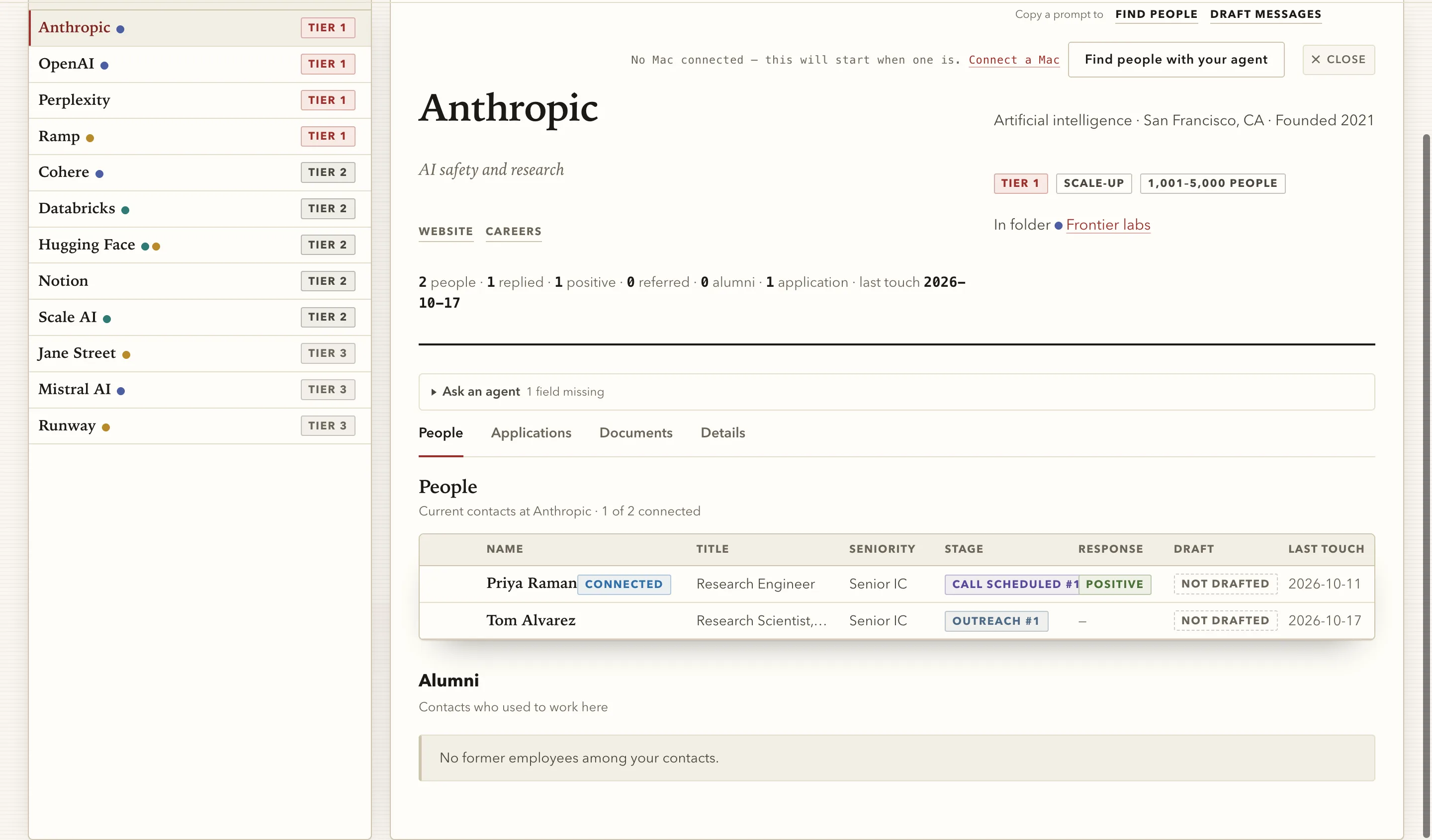
Companies are records of their own, sorted into tiers and hand-picked folders. A company page rolls up everyone you know there, how far each conversation has gone, any alumni among your contacts, and your applications to it.
Drafts grounded in what's on file
Each draft is written from two sources: a sender profile and the contact's record. The profile holds who you are, a paragraph in your own words, your outreach templates, the hours you can meet and your résumé. The contact's record holds their role, the company and the conversation so far.
- 01
Context
who you are, how you write, when you can meet
- 02
Contact
role, company, the thread so far
- 03
Draft
written against your template and the facts on file
- 04
Review
edit it, send it yourself
- 05
Log
"I sent this" moves the stage
A draft may only use facts the CRM holds. When the record is thin, the draft gets shorter rather than reaching for a detail nobody wrote down. A made-up fact about someone can embarrass you in the first minute of a call, so the CRM leaves it out.
When a reply comes in, it goes on the contact's thread, and the next step is one button.
Bring your own agent
The CRM is also an MCP server. Claude Code, Claude Desktop, ChatGPT, Codex and other MCP clients can connect to it, and each one signs in through the app's own OAuth flow. Once connected, an agent can read and update the same records a person edits in the browser.
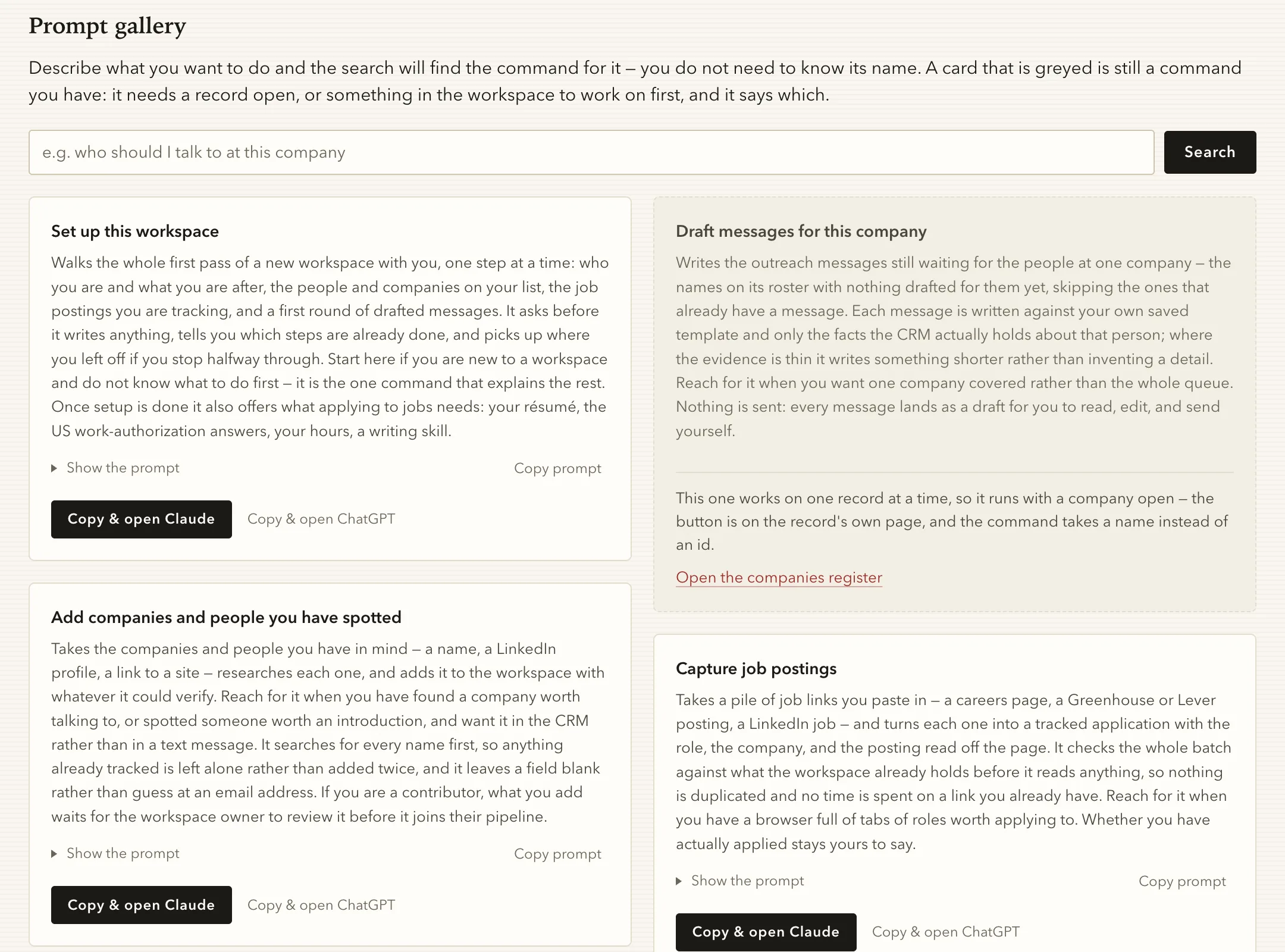
The Agent page has a prompt gallery of commands for that agent: set up a new workspace, add people you've spotted, capture a batch of job postings, find people at a company, draft messages for one company, or prep for a call. The CRM writes each prompt from data it already holds, and the user's own agent does the work. The CRM spends nothing on those runs, and people use the agent they already pay for. The prompts are written to avoid duplicate work. An agent searches for a name before adding it, and it leaves an email field blank rather than guessing.
The meeting brief
Before a call, coffee chat or interview, the Call prep button on a contact's page asks the agent for a one-page brief, meant to be read in the ten minutes before the call. The agent reads the contact's record, the whole thread, any documents attached about them and the sender profile, then writes up to five short parts.
- Them
- What their company does and their role there, in a sentence or two.
- So far
- Replies and earlier calls, with dates. Left out when nothing has happened since the first message.
- Topics
- Three to five things to talk about, shared ground first: an employer, a school, a field you both work in.
- Worth mentioning
- Two or three of your own experiences that fit this person, each with a line on why.
- Questions to ask
- About five open questions they would enjoy answering. One serves what you're after, such as a team to meet, without asking for it outright.
The brief follows the same rule as drafts. Every line has to come from what the CRM holds, and the agent never invents a shared connection or a detail of the person's work. When the evidence is thin, the brief gets shorter. It's filed on the contact's Documents tab, so the notes from the call sit next to the brief that prepared for it, and both are there the next time you talk.
agentlink: running work on your own Mac
A web page can't start a program on your computer, so a button in the CRM couldn't run an agent. Morgan built agentlink to close that gap: a small background agent for macOS that you pair with an app once, using a one-time code. After that it polls the app every few seconds. When a task is waiting, it runs Claude Code headless, with only that app's tools and inside time and budget limits the app sets. It reports progress and a typed result back.
Work can also start without a click. With the automation turned on, logging a scheduled call queues the meeting brief for a paired Mac. The task expires at the call time, so the brief is ready before the call or it doesn't run. Nothing in agentlink is specific to the CRM. Any web app can use it by implementing the same small HTTP contract, and it's open source.
Built for more than one person
The CRM was built as a multi-user product from its first commit. Every record belongs to a workspace, a workspace can have contributors, and anything a contributor adds waits for the owner's review before it joins the pipeline. Uploaded documents are treated as data, never as instructions to the model. All model calls go through one gateway, so changing the drafting model is a one-line config change.
- Workspaces
- The tenancy boundary. Everything belongs to exactly one, and a solo user is a workspace of one.
- Contributors
- Teammates who can add people and companies. Their additions are queued for the owner to accept or reject.
- Agent access
- Agents sign in through the app's own OAuth server, with dynamic client registration and PKCE, and act as the person who connected them.
- Decisions on record
- Nine architecture decision records, from how models are reached to where the app is hosted. A reversed decision gets a new record that links back to the old one.
What Morgan took away
Handing the AI work to the user's own agent changed what the product had to be. The CRM's job became keeping accurate records and writing good prompts. Searching, reading and drafting at scale happen in an agent the user already runs, and the CRM doesn't pay for them.
Limiting drafts to facts on file made them shorter and safer to send. A short message that's accurate is better than a longer one with a detail the model guessed.